CVE-2026-25253 is a one-click token-exfiltration remote code execution bug. You have to interact with a crafted link. Oasis Security later disclosed a separate WebSocket gateway hijack, patched in 2026.2.25. Those are not the same CVE.
Back in January, we published our complete guide to deleting OpenClaw and warned that uninstalling the app wasn't enough. We talked about the "Lethal Trifecta" of agent risks: Data Access, Untrusted Skills, and Persistent Communication.
We didn't expect the situation to get this bad, this fast.
In the five weeks since that guide went live, researchers disclosed multiple CVEs against OpenClaw, including remote code execution, command injection, and authentication bypass. Two of those bugs get mixed up in coverage. CVE-2026-25253 is depthfirst's one-click token-exfiltration RCE, patched in 2026.1.29. The later Oasis WebSocket gateway hijack was disclosed February 26, 2026 and patched in 2026.2.25. Some outlets assign that second bug CVE-2026-32025.
If you're still running OpenClaw, this is the article that should make you stop.
CVE-2026-25253: one-click, user interaction required
GitHub advisory GHSA-g8p2-7wf7-98mq is the record for CVE-2026-25253. depthfirst reported a one-click token-exfiltration path that leads to remote code execution. It was fixed in OpenClaw 2026.1.29. The CVSS vector is UI:Required. Calling this bug "zero-click" is wrong.
The January chain used the Control UI's unvalidated gatewayUrl parameter. You had to follow a crafted link. That is still a serious RCE. It is not the Oasis gateway hijack below.
The later Oasis finding: WebSocket gateway hijack
Most vulnerability write-ups bury the impact under technical jargon. So let me be blunt about what this means for you.
OpenClaw runs a gateway service on your local machine. That gateway uses WebSocket connections to talk to the rest of the system. The problem? Browsers enforce Cross-Origin Resource Sharing (CORS) policies for HTTP requests, but those protections do not apply to WebSocket connections. Your browser will happily open a WebSocket to localhost on behalf of any website you visit.
And OpenClaw's gateway made it worse by failing to validate the WebSocket Origin header. That means the gateway had no way to distinguish between a legitimate local connection and a malicious one coming from an attacker's website through your browser. That is the "Security 101" mistake at the core of this entire vulnerability.
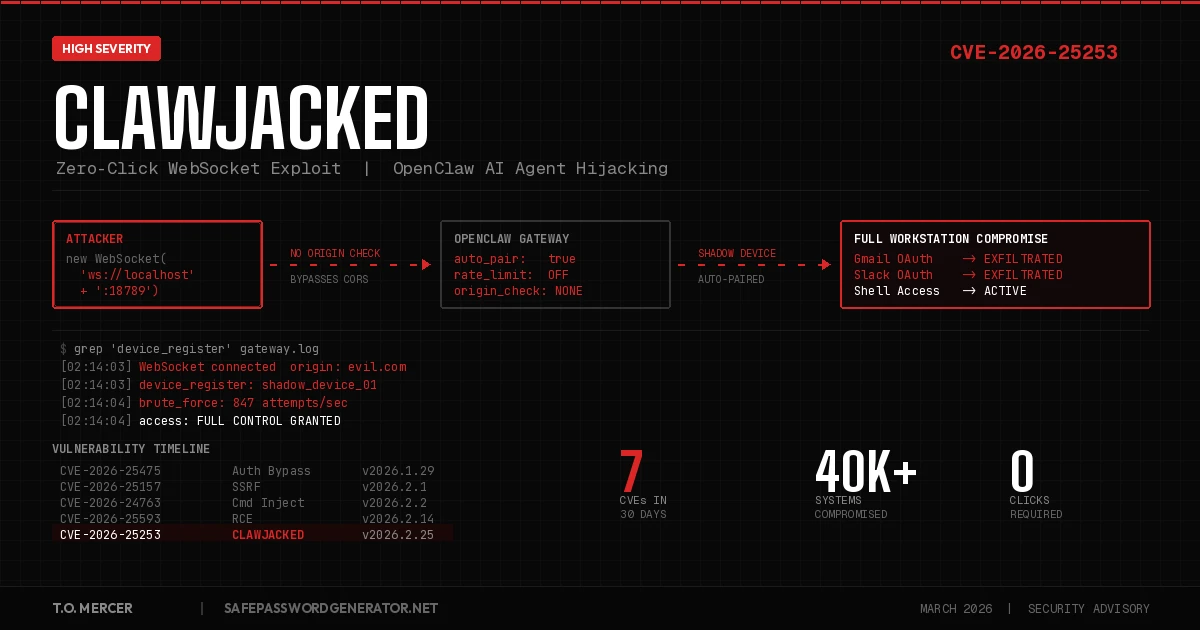
Here is the attack in four steps:
- The Hook: You visit a compromised website. Could be a poisoned blog post, a phishing link, a watering hole attack targeting developers. Nothing unusual happens on screen.
- The Silent Probe: Background JavaScript on that page scans for your local OpenClaw gateway port and opens a WebSocket connection. Because CORS doesn't block WebSocket handshakes to
localhostand the gateway doesn't check theOriginheader, the browser lets it through without a warning. - The Brute Force: The script hammers your gateway password. Because OpenClaw exempts localhost from rate limiting, the attacker gets hundreds of guesses per second with zero throttling and zero logs. Oasis Security confirmed sustained brute-force rates from browser JavaScript alone in their lab testing.
- Full Hijack: The attacker exploits OpenClaw's "Auto-Pairing" feature, which automatically trusts localhost-originating connections for device registration. The script registers itself as a trusted "Shadow Device" without triggering an approval prompt or notification. The attacker now has full interactive access to your AI agent and every system it connects to.
That is it. You visited a webpage. Now someone else controls your OpenClaw agent.
From there, the post-exploitation possibilities are wide open. They can read your Slack messages, search your Gmail, access your GitHub repos, scan your files, and execute shell commands on any connected device. Oasis Security called it a pathway to "full workstation compromise."
The ClawJacked Attack Chain
Pro Tip for Advanced Users: If you must keep OpenClaw running while you evaluate alternatives, bind the gateway strictly to
127.0.0.1(not0.0.0.0or a loose localhost definition) and change it to a non-standard port. The default port18789is what automated browser scripts scan for first. This is not a fix. It is a speed bump that buys you time while you migrate. The only real fix is updating to v2026.2.25+ or deleting the app entirely.
The Damage Is Already Done
This is not a theoretical risk. OpenClaw's security failures were in the news throughout February 2026.
Researchers at Trend Micro found a variant of Atomic Stealer (AMOS), a macOS info-stealing malware, being distributed through malicious skills on ClawHub, OpenClaw's community marketplace.
The Oasis gateway hijack sat alongside several other CVEs disclosed in a short window:
| CVE | Severity | Attack Type | Status |
|---|---|---|---|
| CVE-2026-25253 | High | One-click token-exfiltration RCE (UI:Required). GHSA-g8p2-7wf7-98mq | Patched in v2026.1.29 |
| CVE-2026-32025 (assigned by some outlets) | High | Oasis WebSocket gateway hijack, disclosed Feb 26, 2026. Oasis write-up | Patched in v2026.2.25 |
| CVE-2026-25593 | High | Remote code execution (RCE) | Patched in v2026.2.14 |
| CVE-2026-24763 | High | Command injection | Patched in v2026.2.2 |
| CVE-2026-25157 | Moderate | Server-side request forgery (SSRF) | Patched in v2026.2.1 |
| CVE-2026-25475 | High | Authentication bypass | Patched in v2026.1.29 |
| CVE-2026-26319 | Moderate | Path traversal | Patched in v2026.2.14 |
| CVE-2026-26322 / 26329 | Varies | Undisclosed | Patched in v2026.2.14 |
Seven CVEs across six patch versions in roughly 30 days. That is not a product with isolated bugs. That is a product with fundamental security architecture problems.
Why Our "Lethal Trifecta" Warning Was Right
When we wrote the delete guide in January, we framed OpenClaw's risks around three pillars: Data Access, Untrusted Skills, and Persistent Communication. ClawJacked validates all three at once.
Data Access: ClawJacked gives attackers the same permissions your OpenClaw agent has. If the agent can read your Gmail, so can the attacker. If it has access to your Slack workspace, so does the attacker. Every OAuth token you granted to OpenClaw becomes the attacker's OAuth token.
Untrusted Skills: The ClawHub marketplace has been a known vector. Trend Micro documented Atomic Stealer (AMOS) delivered through malicious OpenClaw skills that trick the agent into running installer commands.
Persistent Communication: This is the part most coverage misses. Even after you patch ClawJacked, the agent's connections to your cloud services remain active through OAuth tokens. A compromised agent could have already exfiltrated data, modified your configurations, or planted secondary access mechanisms. Patching the gateway does not undo what already happened through those connections. For the full breakdown of how these persistent connections work, see our OpenClaw Security Risks deep dive.
This is why we said in January that uninstalling OpenClaw isn't enough. You have to revoke the tokens. That advice hasn't changed. If anything, it's more urgent now.
What You Need to Do Right Now
If you're still running OpenClaw, you have two options. Pick one and execute it today.
Option 1: Patch and Lock Down
Update to OpenClaw version 2026.2.25 or later immediately. This version tightens WebSocket security checks and re-enables rate limiting on localhost connections. It also fixes the log poisoning vulnerability that allowed attackers to inject prompt injections into gateway logs.
After patching, check whether you were already compromised. Run these commands to scan your gateway logs for signs of ClawJacked exploitation:
# Check for unauthorized WebSocket connections (macOS)
grep "WebSocket" ~/Library/Logs/OpenClaw/gateway.log | grep -v "127.0.0.1"

# Check for unauthorized WebSocket connections (Linux)
grep "WebSocket" ~/.openclaw/logs/gateway.log | grep -v "127.0.0.1"

# Look for suspicious device registrations you didn't initiate
grep "device_register" ~/.openclaw/logs/gateway.log | grep -i "shadow\|unknown\|browser"

# Check for outbound connections to known malicious infrastructure
# (IP tied to Atomic Stealer/AMOS variant distributed via ClawHub skills)
grep -E "91\.92\.242\.30" ~/.openclaw/logs/gateway.log

# Check for ClawHub skill installations you don't recognize
ls -la ~/.molthub/skills/ 2>/dev/null
If any of those return results, assume compromise and skip to Option 2.
Additional post-patch steps:
- Review all connected integrations and revoke anything unnecessary.
- Set a strong, unique gateway password (not the default).
- Restrict gateway binding to specific interfaces rather than accepting all localhost traffic.
Option 2: Delete It Entirely
If you've decided that nuking the app is safer than patching (and given seven CVEs in 30 days, that's a reasonable conclusion), use our step-by-step OpenClaw removal guide to ensure no hidden configs remain. The critical steps haven't changed:
- Kill the process and all its naming variants (openclaw, moltbot, clawdbot).
- Delete local files including the three hidden config directories.
- Revoke OAuth tokens from Google, Slack, Discord, GitHub, Microsoft, and Notion.
- Remove ClawHub skill caches from
~/.molthub.
That third step is still the one people skip. And it's still the one that matters most. Deleting the app without revoking tokens is like changing your locks but leaving copies of the key at every coffee shop in town.
Rotate Every Password OpenClaw Touched
Whether you patched or deleted, you need to assume that any credential OpenClaw had access to is compromised. That includes passwords stored in your browser, API keys in .env files, and anything visible in your Slack DMs or email threads.
Generate new passwords for every affected account. NIST SP 800-63B now recommends 15 characters minimum, and 16 is the current standard. Use our password generator to create unique replacements, then verify them with our password checker to make sure they meet 2026 entropy standards. Then take the 2-minute security quiz to find other vulnerabilities in your setup you may have missed.
Use our free client-side generator. Nothing is sent to any server; all randomness happens in your browser with the Web Crypto API.
Generate Password →After rotating credentials, reset your 2FA backup codes and re-enroll your authenticator app for any account OpenClaw had access to. If the agent could read your primary email, an attacker could have hijacked active sessions to bypass 2FA entirely.
Managing the Rotation at Scale
If you're rotating dozens of passwords (and you probably are), doing it manually is brutal. A password manager makes this survivable. I recommend
Affiliate link. SPG earns a commission at no extra cost to you.
NordPass for mine. Built-in breach scanner catches any credentials that were already exposed, zero-knowledge encryption means they can't read your vault, and it works across all devices. Takes five minutes to set up and saves hours of credential management.Affiliate link. I may earn a commission at no extra cost to you.
What to Use Instead of OpenClaw
You still need AI automation. You just need it without the security nightmares. We compared the safest alternatives in our full breakdown.
Security Comparison: OpenClaw vs. Safer Alternatives
| Feature | OpenClaw | Claude Code | n8n | Zapier |
|---|---|---|---|---|
| Execution Model | Full system access | Sandboxed (MCP) | Self-hosted | Cloud-hosted |
| OAuth Token Handling | Persistent, broad scope | No persistent tokens | Scoped per workflow | Scoped per Zap |
| Shell Access | Yes (all nodes) | Sandboxed container | No direct shell | No shell access |
| Skill/Plugin Vetting | ClawHub (unvetted) | Curated MCP servers | Community nodes (reviewed) | Vetted integrations |
| Human-in-the-Loop | Optional (often bypassed) | Built-in confirmation | HITL triggers | Approval steps |
| CVEs in 2026 | 7+ (and counting) | 0 | 0* | 0 |
*n8n had a self-hosted RCE (CVE-2026-21858) in early January 2026. Versions 1.121.0 and later include the fix. Always run the latest patch.
The pattern is clear. OpenClaw gave the agent the keys to everything and assumed nothing would go wrong. The alternatives above enforce boundaries by design.
Read the full alternatives comparison →
The Bigger Problem Nobody Wants to Talk About
ClawJacked is a symptom. The disease is an industry that ships AI agents with broad system access and treats security as an afterthought.
OpenClaw has 100,000+ GitHub stars. High-profile founders hyped it as the future of personal automation. And the product had a critical vulnerability that let any website in the world take over a developer's entire workstation through a basic WebSocket connection that lacked CORS validation and rate limiting on localhost. The post-exploitation surface was enormous because the agent already had authenticated access to Gmail, Slack, GitHub, and whatever else the user had connected.
This was not a sophisticated attack. This was Security 101 material: don't trust local connections by default, enforce rate limiting everywhere, validate WebSocket origins, and treat AI agent permissions like you would any other privileged service account. The fact that these oversights existed in a tool with this much visibility and enterprise adoption tells you something about how the industry is prioritizing speed over safety.
The ClawHub marketplace situation makes it worse. Trend Micro documented Atomic Stealer (AMOS) variants delivered through malicious OpenClaw skills. Developers install a skill that looks legitimate, and then the agent follows installation instructions that pull malware.
As AI agents move from experimental toys into production workflows, every integrated service expands the blast radius when something goes wrong. Your Slack workspace, your Gmail, your GitHub repos, your cloud infrastructure. One compromised agent touches all of it.
The question isn't whether the next OpenClaw-style vulnerability will appear. It's whether the next tool will have the same gaps.
Choose your tools carefully. Audit what you grant access to. And stop assuming that "runs locally" means "runs safely."
Frequently Asked Questions
What is ClawJacked?
Coverage used "ClawJacked" for the later Oasis WebSocket gateway hijack, disclosed February 26, 2026 and patched in 2026.2.25. Some outlets assign that bug CVE-2026-32025. CVE-2026-25253 is a different bug: depthfirst's one-click token-exfiltration RCE, patched in 2026.1.29. See GHSA-g8p2-7wf7-98mq and the Oasis write-up.
Do I need to do anything if I already deleted OpenClaw?
If you followed our delete guide and revoked your OAuth tokens, you're in good shape. If you deleted the app but skipped the token revocation step, go do that now. The tokens are still active on Google, Slack, Discord, and other services until you manually revoke them.
Is patching to 2026.2.25 enough?
It fixes ClawJacked specifically, but given seven CVEs in 30 days, you should evaluate whether you want to continue using a product with this security track record. At minimum, audit all connected integrations, rotate credentials, and set a strong gateway password.
How do I know if my OpenClaw was compromised via ClawJacked?
Run the log scan commands from the "Patch and Lock Down" section above. Specifically, check your gateway logs for unexpected WebSocket connections and device registrations you didn't approve. If your Shodan check from our delete guide shows "OpenClaw Control," assume full compromise and treat every connected account as breached.
What makes the Oasis hijack different from CVE-2026-25253?
They are different bugs. CVE-2026-25253 (patched in v2026.1.29) required you to click a crafted malicious link that exfiltrated your gateway token through the Control UI's unvalidated gatewayUrl parameter. It was a one-click RCE. UI:Required. The Oasis gateway hijack (patched in v2026.2.25) is the later WebSocket path: visiting a compromised site while OpenClaw is running can be enough for the attacker's JavaScript to talk to localhost. Do not file both under CVE-2026-25253.
For the complete step-by-step removal process, read our guide: Delete OpenClaw: Complete Guide (2026).
For safer AI automation alternatives, see: OpenClaw Alternatives 2026.
Tim O. covers password security, digital hygiene, and applied cryptography at SafePasswordGenerator.net.