Last updated: January 4, 2026
TL;DR
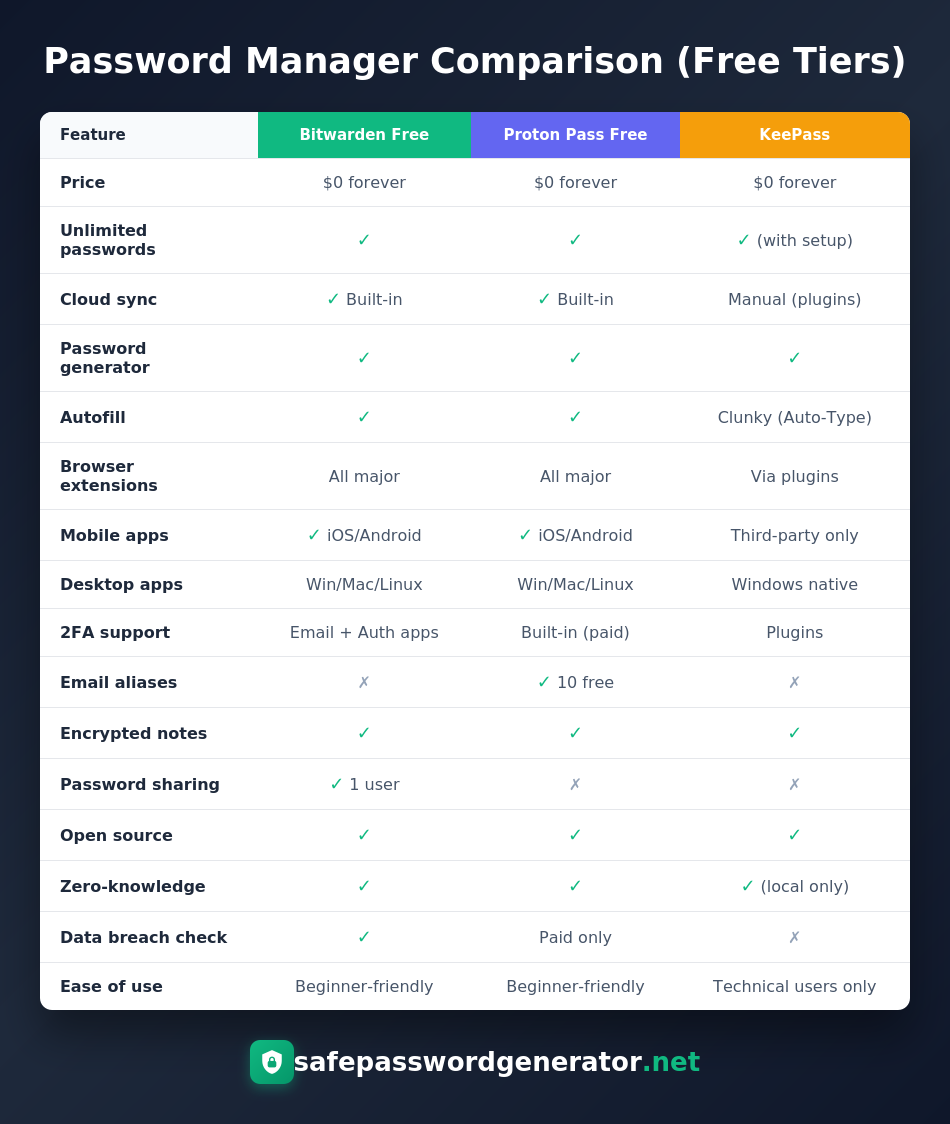
Bitwarden is the best free password manager for most people. Unlimited passwords, unlimited devices, cloud sync, breach monitoring, and passkey support for $0. Proton Pass wins for privacy (Swiss jurisdiction, 10 free email aliases, quantum-resistant encryption). KeePass is for technical users who want local-only storage with zero cloud involvement. All three are open source, independently audited, and have never been breached. Skip LastPass entirely.
Most people assume free software means you're the product. Your data gets harvested, sold to advertisers, or worse. And honestly? That's usually true.
But password managers are different. The best free options are open source, which means thousands of developers can see exactly what the code does. No hidden tracking. No secret data collection. Just software that does what it claims.
I'm going to show you three free password managers that are actually more secure than some paid alternatives. One of those paid alternatives lost customer vault data to hackers and has been linked to over $150 million in cryptocurrency theft. More on that disaster in a second.
Why I Stopped Recommending Paid Password Managers to Everyone
In August 2022, LastPass (one of the most popular paid password managers) got breached. Hackers stole source code first, then used that access to target a DevOps engineer's home computer. They installed a keylogger, captured his master password after he logged in with MFA, and eventually downloaded backups of customer password vaults.
The encrypted vaults. The ones containing everyone's passwords.
LastPass kept saying "your passwords are safe because they're encrypted." Technically true. But encryption only works if your master password is strong enough to resist brute force attacks. A lot of people used weak master passwords. And criminals have been cracking them ever since.
In March 2025, the FBI and Secret Service officially linked the LastPass breach to over $150 million in cryptocurrency heists. Researchers had been watching six-figure crypto thefts happening monthly, all targeting people who stored their crypto seed phrases in LastPass.
The company still denies any "conclusive evidence" connecting the thefts to their breach. Meanwhile, their former customers keep losing money.
I tell you this not to scare you, but to make a point: paying for a password manager doesn't guarantee security. What matters is transparency, independent audits, and a track record of not losing customer data.
What Makes a Free Password Manager Actually Secure in 2026
Before I get into specific recommendations, here's what separates secure password managers from marketing fluff.
Open Source Code
If the code is public, security researchers worldwide can examine it for vulnerabilities. Closed-source password managers ask you to trust them blindly. Open source lets you verify.
Independent Security Audits
Any company can claim they're secure. Legitimate ones hire third-party firms like Cure53 or Mandiant to try breaking their systems, then publish the results. If a password manager doesn't publish audit reports, ask yourself why.
Zero-Knowledge Architecture
This means the company cannot access your passwords even if they wanted to. Your data gets encrypted on your device before it ever touches their servers. Without your master password, the encrypted blob is useless.
Passkey and Passwordless Support
Passwords are dying. Passkeys (the FIDO2 standard backed by Apple, Google, and Microsoft) are replacing them. A modern password manager in 2026 must support storing and syncing passkeys alongside traditional passwords. All three managers I recommend do.
No Breach History
Self-explanatory. If a company has lost customer data before, that's a red flag regardless of what improvements they claim to have made.
All three password managers below check every box. And they're completely free.
1. Bitwarden Free: Best for Most People
If you want a password manager that just works, start here.
Bitwarden gives you unlimited password storage across unlimited devices for $0. No catch. No 14-day trial that expires. No "free tier" that only works on one device (looking at you, LastPass circa 2021).
What You Get for Free
- Unlimited passwords, passkeys, credit cards, secure notes, and identity documents
- Sync across every device you own (phone, laptop, tablet, work computer)
- Browser extensions for Chrome, Firefox, Safari, Edge, Brave, and more
- Native mobile apps for iOS and Android
- Password generator with customizable length and complexity
- Data breach monitoring (checks if your credentials appeared in known breaches)
- Secure password sharing with one other person
- Full passkey support for passwordless logins
Why Bitwarden Is Secure
Bitwarden is the most audited password manager I've seen. In 2024 alone, they had separate security assessments from Cure53, Mandiant, and Fracture Labs covering their web app, mobile apps, network infrastructure, and SDK. They publish every report publicly.
They're also fully open source. The entire codebase sits on GitHub for anyone to examine. And they hold SOC 2 Type 2, ISO 27001, and HIPAA certifications for the enterprise crowd.
Breach detection speed matters. Bitwarden's vault health reports flag weak, reused, and exposed passwords the moment you log in. The average user has 100+ accounts. Knowing which ones are compromised (and fixing them fast) is how you stay ahead of attackers.
Who Should Use Bitwarden
Anyone switching from LastPass or trying their first password manager. The interface is intuitive, setup takes five minutes, and you won't hit artificial limitations that force you to upgrade.
Bitwarden Premium ($10/year)
Built-in TOTP authenticator (so you don't need a separate 2FA app), 1GB encrypted file storage, hardware security key support (YubiKey), and emergency access. Honestly, the free tier covers 90% of what most people need.
2. Proton Pass Free: Best for Privacy-Focused Users
Proton is the company behind ProtonMail and ProtonVPN. They were founded by scientists at CERN with a mission to build privacy-respecting alternatives to Big Tech services. Their password manager launched in 2023 and has quickly become a serious competitor.
What You Get for Free
- Unlimited passwords and passkeys across unlimited devices
- Sync across all platforms (iOS, Android, Windows, Mac, Linux, browser extensions)
- Password generator with autofill
- 10 email aliases (hide-my-email addresses that forward to your real inbox)
- Encrypted notes
- End-to-end encryption on all fields (not just passwords, but usernames and URLs too)
Why Proton Pass Is Secure
Proton Pass completed a full security audit by Cure53 in 2023. The auditors tested all mobile apps, browser extensions, and APIs. Their conclusion: "The overall state of security across Proton's applications and platforms is commendable."
In July 2025, Proton achieved SOC 2 Type 2 certification. In May 2024, they got ISO 27001 certified. The company is headquartered in Switzerland, which has some of the strongest privacy laws in the world. Swiss authorities can't be compelled to hand over data to foreign governments the way US-based companies can.
All Proton Pass code is open source and available on GitHub.
Future-proof encryption. Proton uses 256-bit AES-GCM encryption, but they're also actively researching post-quantum cryptography. As quantum computing advances, encryption that's "unbreakable" today could become vulnerable. Proton's roadmap includes quantum-resistant algorithms, making it a strong choice for users thinking beyond 2026.
The Email Alias Feature Is Underrated
Every time you sign up for a new service, Proton Pass can generate a unique email alias. If that service gets breached or starts spamming you, disable that one alias. Your real email stays protected and spam-free.
Most password managers charge extra for this. Proton gives you 10 aliases free.
Who Should Use Proton Pass
Privacy enthusiasts. People already using ProtonMail or ProtonVPN (the ecosystem integration is seamless). Anyone who wants email aliasing without paying for a separate service. Users who want a company that's actively preparing for post-quantum threats.
Proton Pass Plus (~$4/month)
Unlimited email aliases, integrated 2FA, Dark Web monitoring, Proton Sentinel (AI-powered account protection), and multiple vaults. The Proton Unlimited plan ($10/month) bundles the password manager with VPN, encrypted email, cloud storage, and calendar.
3. KeePass: Best for Technical Users Who Want Full Control
KeePass is the paranoid choice. And I mean that as a compliment.
Unlike Bitwarden and Proton Pass, KeePass doesn't store anything in the cloud. Your password database lives as an encrypted file on your own device. You control where it goes. You control who has access. No company servers involved.
This approach has tradeoffs. Setup is more involved. Syncing between devices requires manual configuration (usually via Dropbox, Google Drive, or a personal server). The interface looks like it was designed in 2003, because it was.
But for people who don't trust any company with their passwords, KeePass is the answer.
What You Get
- Unlimited password storage
- Local-only encrypted database (AES-256 or ChaCha20)
- Runs on Windows natively, Linux/Mac via Mono or third-party ports
- Massive plugin ecosystem for browser integration, cloud sync, and additional features
- Key file support (two-factor protection for your vault)
- Completely free, open source since 2003
Why KeePass Is Secure
KeePass passed the EU-FOSSA security audit in 2016 with zero issues found. The German Federal Office for Information Security (BSI) officially recommends it. Because there's no cloud component, there's no central server for hackers to target. Your security depends entirely on your own practices.
The code has been open source for over 20 years. That's two decades of security researchers, developers, and privacy advocates examining every line.
Best for shared or sensitive environments. In healthcare, legal, or government settings where cloud-based tools face compliance restrictions, KeePass remains the go-to solution. You can store the encrypted database on an air-gapped machine or secure USB drive with zero internet exposure.
The Honest Downsides
KeePass is not user-friendly. Auto-fill is clunky compared to modern alternatives. There's no official mobile app (you'll need third-party apps like KeePassDX for Android or Strongbox for iOS). Setting up sync between devices requires technical knowledge. Native passkey support is limited compared to Bitwarden and Proton Pass.
If you're comfortable with that, KeePass offers security that cloud-based managers simply cannot match. No company can leak your data if no company has your data.
Who Should Use KeePass
Technical users who want maximum control. People in high-security or compliance-heavy environments. Anyone who fundamentally distrusts cloud storage for sensitive data.
Quick Decision Guide: Which Free Password Manager Should You Choose?
| If you want... | Choose this |
|---|---|
| Easiest setup, works immediately | Bitwarden |
| Best free feature set overall | Bitwarden |
| Swiss privacy jurisdiction | Proton Pass |
| Free email aliases | Proton Pass |
| Integration with ProtonMail/VPN | Proton Pass |
| Local-only storage, no cloud | KeePass |
| Maximum control over your data | KeePass |
| Best passkey support | Bitwarden |
| Future-proof (quantum-resistant roadmap) | Proton Pass |
| Compliance-heavy environments | KeePass |
The Bottom Line
You don't need to pay $50/year for password security. The free options I've covered are open source, independently audited, and have never lost customer data.
Meanwhile, one of the most popular paid password managers got breached and the fallout is still destroying people financially three years later.
Free doesn't mean inferior. In this case, it means transparent.
Pick one of these three, set a strong master password (at least 16 characters, random, never used anywhere else), and you're ahead of 90% of internet users. Better yet, enable passkeys wherever available and start transitioning away from passwords entirely.
Frequently Asked Questions
Is Bitwarden actually free?
Yes. Bitwarden's free tier includes unlimited passwords, unlimited devices, cloud sync, browser extensions, mobile apps, passkey support, and data breach checking. The $10/year premium adds TOTP authentication, file attachments, and emergency access, but most users won't need it.
Is Proton Pass better than Bitwarden?
They're optimized for different priorities. Bitwarden has more features for free (breach monitoring, password sharing, better passkey support). Proton Pass has better privacy credentials (Swiss jurisdiction, email aliases, quantum-resistant encryption roadmap). For most people, Bitwarden is easier. For privacy-focused users, Proton Pass edges ahead.
Can free password managers be trusted?
The three covered here (Bitwarden, Proton Pass, KeePass) are more trustworthy than many paid alternatives. They're open source (code is publicly auditable), independently security-tested, and have zero breach history. LastPass, a paid manager, lost customer vault data in 2022.
What happened to LastPass?
In 2022, hackers breached LastPass and stole encrypted customer password vaults. In March 2025, the FBI and Secret Service linked the breach to over $150 million in cryptocurrency theft. Criminals have been cracking weak master passwords and draining accounts ever since.
Is KeePass safe to use in 2026?
Yes, but it requires technical knowledge. KeePass stores passwords locally (not in the cloud), so there's no central target for hackers. It passed the EU-FOSSA security audit and is recommended by the German Federal Office for Information Security. The tradeoff is a dated interface, manual sync setup, and limited passkey support.
Which free password manager is best for iPhone?
Bitwarden or Proton Pass. Both have native iOS apps with full feature parity to their desktop versions, including passkey support. KeePass requires third-party apps like Strongbox or KeePassium, which work well but add complexity.
What is a passkey and do I need one?
A passkey is a passwordless login method using cryptographic keys stored on your device. Instead of typing a password, you authenticate with Face ID, fingerprint, or device PIN. Passkeys can't be phished or stolen in a data breach. Both Bitwarden and Proton Pass support storing and syncing passkeys for free. If a website offers passkey login, use it.
Are these password managers safe from quantum computing?
Current encryption (AES-256) is considered safe for now, but quantum computers could eventually crack it. Proton is actively developing quantum-resistant encryption for future releases. KeePass supports ChaCha20, which has different quantum resistance properties. For most users in 2026, this isn't an immediate concern, but it's worth watching.