TL;DR: Microsoft 365 MFA went down across North America today due to a failure at Duo (Cisco), a third-party MFA provider. Microsoft's own infrastructure never failed. Service is restored. Here is what happened, why it matters, and what you need to do before the next one hits.
Microsoft has confirmed the outage is resolved. The root cause was not a Microsoft infrastructure failure. Duo (Cisco), a third-party MFA provider, deployed a fix within their environment to restore service. Microsoft confirmed their own services were operating as expected throughout the entire incident. That detail changes everything. Keep reading.
Microsoft 365 MFA was down for users across North America earlier today. If you hit 504 Gateway Timeout errors trying to sign in to Microsoft 365, here is exactly what happened and what you need to take away from it.
The Details
- Incident ID: MO1237461
- Status: Resolved
- Started: 2:52 PM UTC, February 23, 2026
- Root Cause: Duo (Cisco) third-party MFA provider failure, not Microsoft infrastructure
- Symptoms: MFA push notifications failing, SMS codes not arriving, 504 errors on login
The Official Timeline (via @MSFT365Status)
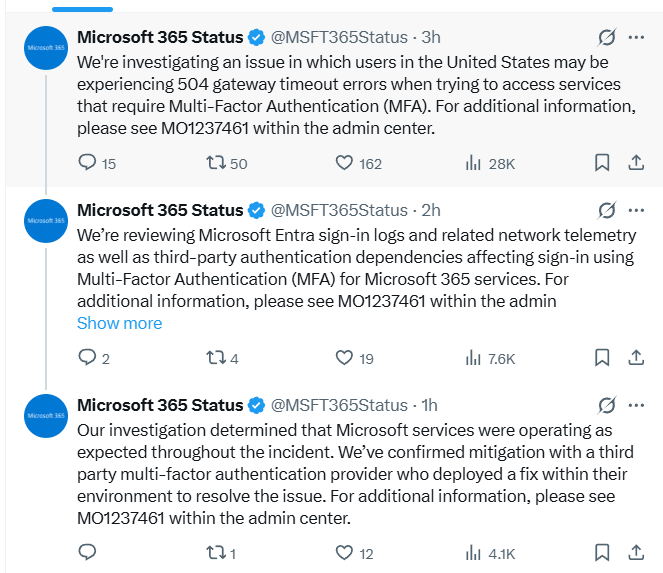
Three posts. Three hours. Here is what that timeline actually tells you:
- Hour one: Microsoft flags widespread 504 Gateway Timeout errors blocking MFA access across the United States.
- Hour two: Microsoft reveals they are already reviewing "third-party authentication dependencies affecting sign-in using Multi-Factor Authentication." They knew early it was pointing outside their own infrastructure.
- Hour three: Confirmed. Microsoft's own services were operating as expected the entire time. Duo (Cisco) had the problem and deployed the fix.
Most people will read this as "outage over, move on." That is the wrong takeaway.
Your 5-Step Action Plan
1. Check the Official Dashboard
Go to the Microsoft 365 Service Health Dashboard and search for incident ID MO1237461. That is your ground truth for this incident and any future ones. Bookmark it now before the next outage hits.
2. Stop Hammering the Login Button
Repeatedly hitting "Resend Code" can trigger temporary blocks on your account or IP. Wait a few minutes between attempts and let infrastructure catch up. Patience saves you a secondary headache.
3. Use a Temporary Access Pass If You Have One
If you are an admin and configured Temporary Access Passes ahead of time, incidents like this are exactly what they were designed for. They let you bypass the standard MFA flow without punching a hole in your security posture. If you do not have these configured yet, do it today while this is still fresh.
4. Do Not Disable MFA Organization-Wide
This one is non-negotiable. Disabling MFA globally to restore access trades a temporary inconvenience for a permanent vulnerability. Attackers actively monitor outage reports and move the moment they see MFA enforcement drop. Keep it enforced. Absorb the disruption.
Now that service is restored, check your sign-in logs. While the outage was a false opening, it is the perfect time to see if any unusual login attempts were blocked during the window when the 504 errors were clearing. Attackers know the chaos of an outage creates distraction. Verify nothing slipped through.
5. Audit Your Password Foundation Right Now
Use this moment wisely. While your team was locked out this afternoon, your passwords were the only thing standing between your accounts and anyone who wanted in. Did that feel comfortable?
The Hard Lesson: MFA Is a Layer, Not a Wall
Here is the part that should keep every IT admin up at night.
Microsoft never failed today. Their servers were running fine. Their authentication infrastructure held. The failure lived entirely inside Duo's environment, a vendor most affected users probably never heard of, never thought about, and had zero visibility into when things went wrong.
This is what a supply chain dependency failure looks like in identity security. You trusted Microsoft. Microsoft trusted Duo. Duo had a bad day. You got locked out of your business.
Two weeks ago Microsoft finished forcing MFA on every Microsoft 365 admin. That mandate is correct. MFA reduces account compromise risk dramatically and the data backs that up. But today is proof that MFA is one layer in a stack, not a wall you stand behind and stop thinking.
When any layer in that stack fails, whether it is Microsoft, Duo, another third-party provider, or a vendor you have never audited, your password is what remains. No MFA prompt. No push notification. Just your password, sitting between your data and whoever wants it.
If you have been using a weak or reused password because you "had MFA anyway," today was your warning shot. The next incident may not resolve in three hours.
Strong, unique passwords are not a backup plan. They are the foundation every other security layer is built on top of. A strong foundation does not save you from every attack. But a weak one guarantees you will not survive the ones that matter.
Use a secure password generator to create strong, unique passwords for every account. When MFA goes down again, your password is the only thing standing between you and the door.
Use a Secure Password Generator →This post was updated after Microsoft confirmed resolution of incident MO1237461 via @MSFT365Status on X. For real-time updates on Microsoft 365 service health, follow @MSFT365Status.