By Tim O. · April 25, 2026 · 12 min read
4 Stats That Prove Your Password Is Dead
The shift documented in SentinelOne's 2026 Annual Threat Report isn't subtle: identity is the new perimeter. The 100+ page report, released at RSAC last month, details how attackers have moved past brute-force hacking into something far more effective. They're using stolen passwords, compromised tokens, and phished credentials to access systems with perfectly valid logins.
- SentinelOne's 2026 Annual Threat Report confirms attackers have moved past traditional "hacking." They're using stolen credentials, phished tokens, and compromised accounts to walk through the front door
- Verizon's latest DBIR backs it up: 88% of basic web application breaches involved stolen credentials. Not exploits. Not zero-days. Stolen passwords
- Credential-related incidents surged 389% year-over-year, and attackers can move from stolen login to full exploitation in as little as 14 minutes
- If a Fortune 500 company with a full security team can't stop someone using valid credentials, your reused Netflix password doesn't stand a chance
- Passkeys are the next step most people are ignoring, and the UK's NCSC just made them their top-line recommendation
That means our old "strong password" advice is actually making some of us less safe. It creates a false sense of security. You pick a password you think is clever, reuse it across a few accounts, and assume you're covered. Meanwhile, attackers aren't trying to crack your password at all. They already have it.
Once they're inside, they look exactly like a real user. The security tools that companies spend millions on? Many of them can't tell the difference between you logging in and a criminal logging in with your password. SentinelOne calls this the "Identity Paradox," and it's the central problem of modern cybersecurity: the system can verify that the login is authorized, but it can't verify that the person behind the login is actually you.
This has massive implications for regular people. Those stolen credentials don't just come from corporate breaches. They come from your accounts. Your email. Your streaming services. Your bank login. Your password manager (if you even use one).
Let me walk you through the four numbers from these reports that should change how you think about passwords today.
Stat #1: 88% of web app breaches used stolen credentials
This one comes from Verizon's 2025 Data Breach Investigations Report, which analyzed over 22,000 security incidents. In breaches involving basic web applications (the kind of apps you use every day: email, banking, shopping, social media), 88% of them involved stolen credentials as the attack method.
Not sophisticated exploits. Not AI-powered hacking tools. Stolen usernames and passwords.
Think about what that means for a second. Nearly 9 out of 10 times someone's web account gets compromised, the attacker already had the password. They didn't need to find a vulnerability in the software. They didn't need to deploy malware. They just typed in a username and password that worked.
Where do those credentials come from? Three main places:
Phishing: Someone clicked a link in a fake email, entered their password on a lookalike site, and handed it directly to the attacker. AI has made these emails nearly indistinguishable from real ones. The broken English and sketchy formatting that used to give phishing away are gone.
Data breaches at other services: You signed up for some random service five years ago using the same email and password you use for your bank. That service gets breached. Now the attacker has a credential pair that works on your bank, your email, and anywhere else you reused that password.
Infostealer malware: Software that silently runs on your device and captures every password you type, every session cookie in your browser, and every saved login in your credential store. According to the Verizon report, 30% of compromised systems in infostealer infections were enterprise-licensed devices, and 46% of those were holding both personal and business credentials. People are mixing work and personal logins on the same machines. Infostealers increased by 30% in 2025, with 14% more variants detected compared to the previous year.
How do you know if you have an infostealer? Most people don't, which is the problem. These tools are designed to be invisible. A few warning signs: unexpected browser extensions you didn't install, your browser's saved passwords disappearing or changing, login sessions being invalidated on services you use regularly, or unfamiliar processes running in Task Manager (Windows) or Activity Monitor (Mac). If you suspect something, run a full scan with a reputable antivirus tool (Malwarebytes is a solid free option). One underrated defense: a password manager won't autofill your credentials on a phishing site because it checks the URL before filling anything in. If your password manager refuses to autofill on a site that "looks right," that's a signal the site might be a fake.
What to do about it: Every account needs a unique password. Not a variation of the same one. Not your dog's name with different numbers at the end. A completely random, unique password for every single account. A password generator makes this take about 3 seconds per account.
Stat #2: Credential-related incidents surged 389% year-over-year
According to eSentire's 2026 Annual Cyber Threat Report, account compromise incidents exploded by 389% compared to the previous year. These incidents now represent 50% of all observed threats across their customer base of over 2,000 organizations.
SentinelOne's report tells the same story from a different angle: attackers are "systematically abusing trusted identity systems." A single account can access dozens of connected systems. Your Google account connects to your email, your calendar, your documents, your photos, your saved passwords in Chrome, your connected apps, and potentially your work systems if you use Google Workspace. One stolen credential can unlock all of it.
The report frames this as a fundamental architectural failure, not just a user behavior problem. Companies have built their entire infrastructure around identity as the security boundary. When attackers operate with valid credentials, that boundary doesn't just weaken. It disappears. The Snowflake breach from 2024 is a case study: attackers realized MFA wasn't mandatory on the cloud data platform, exploited vulnerable credentials, and breached multiple major companies (including AT&T, Ticketmaster, and Santander) through a single vector. Simply enabling MFA might have stopped the entire campaign.
The same logic applies at the personal level. If your email account is your identity hub (and for most people it is), a stolen email password cascades into everything connected to it. Password resets, account recovery, two-factor codes sent via email: all of it flows through that one compromised account.
What to do about it: Two things. First, turn on two-factor authentication everywhere it's available. Use an authenticator app (Google Authenticator, Authy, Microsoft Authenticator), not SMS codes. SMS is vulnerable to SIM-swapping attacks where someone convinces your phone carrier to transfer your number to their device. Second, use a password checker to see if your current passwords have appeared in known breaches. If they have, change them immediately.
Stat #3: Attackers move from stolen login to full exploitation in 14 minutes
This stat comes from eSentire's analysis and it's the one that should change your behavior today. Once an attacker has valid credentials, the median time from initial access to full exploitation is 14 minutes. Not hours. Not days. Fourteen minutes to go from "I have your login" to "I own your account."
SentinelOne's report confirms the speed problem from the enterprise side: attackers are leveraging automated workflows to accelerate credential harvesting and lateral movement, often operating in milliseconds. They call this the "Machine Multiplier," and the concept is straightforward. Attackers are using the same kind of automation and AI tools that legitimate businesses use, just pointed at credential exploitation. Vulnerability scanning, credential testing, and lateral movement across connected accounts all happen at machine speed now.
Imagine someone gets your email password from a data breach. Within 14 minutes, they could:
- Log into your email
- Search for password reset confirmations from your bank, investment accounts, and other services
- Use "forgot password" on those services, intercept the reset emails
- Change the passwords on your financial accounts
- Lock you out of your own email by changing that password too
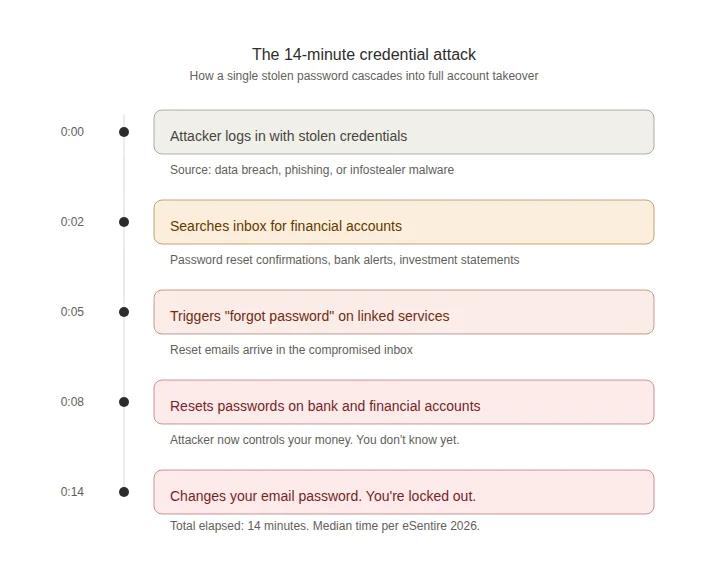
By the time you notice something is wrong, it's already done. You're not going to catch a 14-minute attack by checking your email once a day. The only defense is making sure the credential doesn't work in the first place (unique passwords) or that a stolen password alone isn't enough to get in (2FA).
What to do about it: If you get any notification that one of your accounts has been accessed from a new device or location, treat it as an emergency. Don't wait until tomorrow. Don't wait until after dinner. Change the password on that account and every account that uses the same password immediately. This is another reason why every account needs a unique password: it limits the blast radius when one credential gets stolen.
Stat #4: Only 3% of compromised passwords met basic complexity requirements
This is the most damning number of all, and it comes from the Verizon DBIR's analysis of credentials found in breaches. Out of all the compromised passwords they examined, only 3% met even basic complexity requirements.
That means 97% of the passwords that ended up in attacker hands were weak by any reasonable standard. Short passwords. Passwords without special characters. Passwords that were just words with a number tacked on the end. "Password123." "Summer2024." "CompanyName1."
I've personally analyzed over 50,000 breached passwords, and this tracks with everything I've seen. People consistently underestimate what "strong" means. They capitalize the first letter, swap a few characters ("@" for "a," "0" for "o"), add a "!" at the end, and call it a day. Password cracking tools figured out those patterns years ago. PassGAN, an AI-powered password cracking tool, can break 85% of common passwords in under ten seconds.
The Verizon DBIR also found that only 49% of a typical user's passwords across different services were actually unique. Half your passwords are duplicates of each other. That means when one account gets breached, attackers are immediately testing that same credential against every other service you might use, and they're succeeding about half the time.
The gap between what people think is a strong password and what actually resists modern cracking tools is enormous. An 8-character password with mixed case and numbers? Minutes to crack. A 16-character randomly generated password with the full character set? Centuries. The difference is entropy: randomness and length are what make a password strong, not cleverness.
What to do about it: Stop trying to create "clever" passwords. Your brain isn't built for randomness. Use a password generator to create passwords that are at least 16 characters long with uppercase, lowercase, numbers, and symbols. Then store them in a password manager so you don't have to remember them.
Why this report matters for regular people
SentinelOne wrote this report for CISOs and security teams at Fortune 500 companies. But the findings describe a structural problem that affects everyone who logs into anything online.
Attackers have industrialized credential theft. They're not sitting in a dark room guessing your password one character at a time. They're running automated systems that harvest millions of credentials from breaches, test them against thousands of services simultaneously, and exploit whatever works, all faster than any human can respond. SentinelOne's report documents how this industrialization has reached the point where attackers are compromising CI/CD pipelines and build systems to inject malicious code before software even reaches production. If they can do that to a software company, your personal accounts are a casual side project.
The 54% overlap between ransomware victims and prior infostealer credential exposure (from the Verizon DBIR) puts a fine point on it: most of these attacks aren't separate events. They're sequential. Your credentials get stolen in Phase 1. They get used in Phase 2. The gap between theft and exploitation is closing, and 14 minutes is the current median.
The good news: the fix is straightforward. It's not expensive. It doesn't require technical skills.
The 30-minute fix: what to do right now
You don't need to read a 100-page threat report to protect yourself. You need to do these five things:
- Get a password manager. This is non-negotiable in 2026. You need unique passwords for every account, and you can't memorize them all. Pick one and set it up today. Bitwarden has a free tier. 1Password and NordPass are solid paid options with additional features like breach monitoring. Beyond storing passwords, a password manager also protects you from phishing because it checks the site URL before autofilling credentials. If you land on a fake site, the password manager simply won't fill in your login.
- Generate new passwords for your critical accounts. Start with email, banking, and anything financial. Use a password generator to create 16+ character random passwords. Save them in your password manager. This alone puts you ahead of 97% of the people whose passwords end up in breach databases.
- Turn on 2FA everywhere. Email, banking, social media, cloud storage. Use an authenticator app, not SMS. This is the single most effective defense against stolen credentials because even if someone has your password, they still can't log in without the second factor. For more on why SMS codes are a problem and how different 2FA methods compare, check out our 2FA vs MFA guide.
- Check your current exposure. Run your email through Have I Been Pwned to see which breaches your data appears in. For any compromised accounts, change the passwords immediately and make sure the new ones are unique.
- Close your dormant accounts. This one gets overlooked constantly. That MyFitnessPal account from 2018? The forum you signed up for in college? The free trial you forgot about? Each one is a liability. Dormant accounts sit in breach databases for years with credentials that nobody ever changes. The Snowflake breach that hit AT&T and Ticketmaster happened because of credential exposure from exactly this kind of neglected access. Go through your password manager (or your email inbox, searching for "welcome" or "confirm your account") and delete every account you no longer use. If you can't delete it, at least change the password to something unique and enable 2FA.
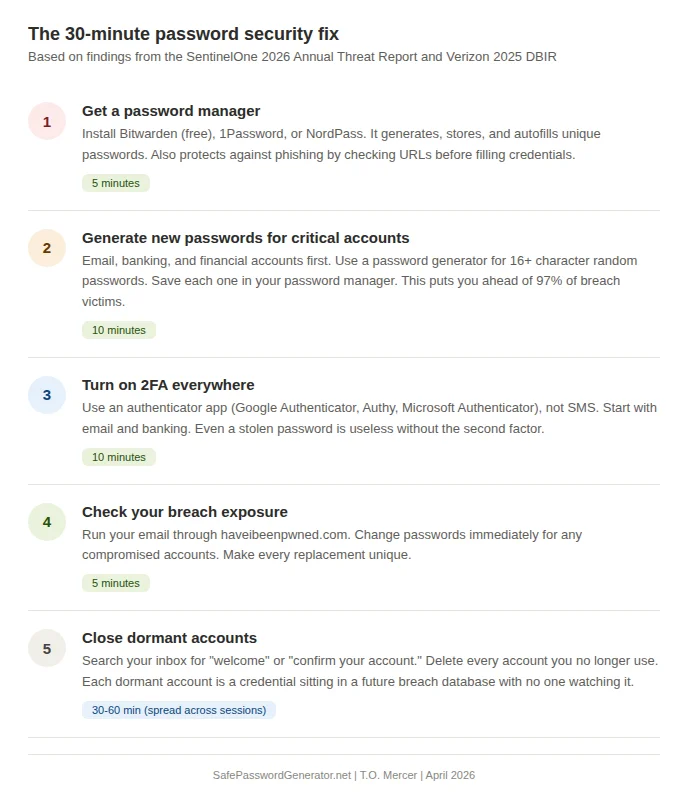
That's five steps. Thirty minutes for the first four. The fifth might take an hour spread across a few sessions, but it eliminates attack surface that most people never think about.
The attackers have industrialized. Your password security shouldn't still be manual.
The SentinelOne report makes one thing clear: passwords are the #1 target.
A password manager generates, stores, and autofills unique credentials for every account. No reuse. No guessing. No 14-minute takeovers. I recommend NordPass for password management. Independent audits. Breach monitoring. Zero-knowledge encryption.
Affiliate link. SPG earns a commission at no extra cost to you.
Try NordPass FreeAffiliate link. I may earn a commission at no extra cost to you.
What about passkeys? Are passwords actually dead?
If you've been paying attention to Apple, Google, and Microsoft this year, you've heard the word "passkeys" a lot. Microsoft made passkeys the default for new accounts in 2025. Apple and Google have baked them into their operating systems. The UK's National Cyber Security Centre (NCSC) announced at CYBERUK 2026 that they now officially recommend passkeys wherever a service supports them.
The UK's NCSC has officially shifted its guidance at CYBERUK 2026 in Glasgow, recommending passkeys as the default authentication choice for all consumers. Their assessment: even under realistic (non-perfect) conditions, passkeys offer stronger protection than the best traditional MFA implementations. This is the first time a major government cybersecurity agency has made passkeys their top-line recommendation.
So are passkeys the answer? Is the password actually dead?
Almost. But not yet.
Passkeys use FIDO2 cryptographic key pairs instead of shared secrets (passwords). When you set up a passkey on a site, your device generates a private key (stored locally or in your password manager) and a public key (sent to the website). When you log in, you authenticate with your fingerprint, face scan, or device PIN. The private key never leaves your device, and the website never stores a secret that can be stolen in a breach. Passkeys are also phishing-proof by design: the credential is cryptographically bound to the specific website domain, so a passkey created for bank.com won't work on bank-secure-scam.com. There's no password to intercept, no code to steal, no secret to phish.
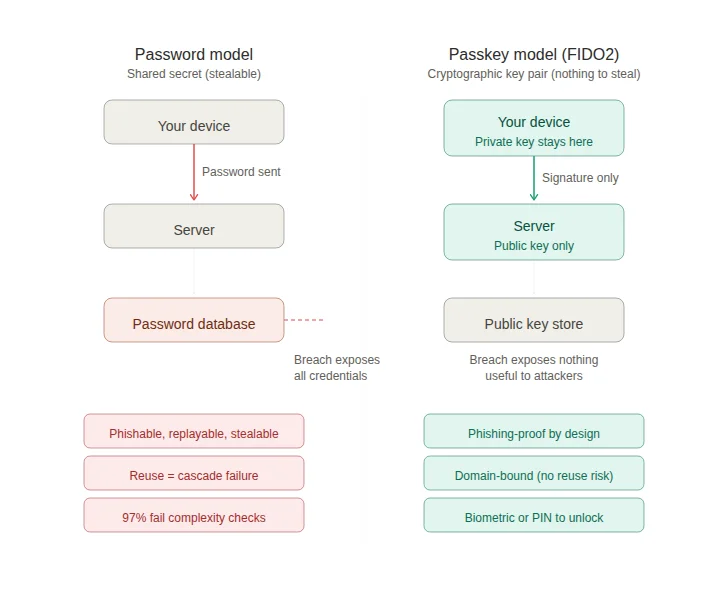
That's a fundamentally better security model. The FIDO Alliance reports that 53% of people have now enabled passkeys on at least one account, and organizations implementing passkeys see 20% higher sign-in success rates compared to passwords.
So why am I not telling you to ditch passwords entirely?
Two reasons. First, passkey support isn't universal yet. Plenty of services, especially smaller ones, older banking platforms, and niche apps, still require passwords. You need a strong password strategy for those accounts whether you like it or not. Second, your synced passkeys are only as secure as the account protecting them. If your Apple, Google, or Microsoft account gets compromised (because you're using a weak password on it, for example), your passkeys go with it.
The practical advice for right now: Enable passkeys on every account that supports them, starting with email, banking, and cloud storage. Use passkeys.directory to check which services support passkeys. For everything that doesn't support passkeys yet, keep using unique, randomly generated passwords stored in a password manager. The two approaches aren't competing; they're complementary. Password managers like 1Password, Bitwarden, and NordPass are evolving into passkey managers that handle both types of credentials in one vault.
Passwords aren't completely dead yet. But the 2026 data makes it clear they're dying, and passkeys are what's replacing them. The sooner you start setting up passkeys alongside your password manager, the smaller your attack surface becomes.
Frequently asked questions
What is the SentinelOne 2026 Annual Threat Report?
It's a comprehensive cybersecurity report released at RSAC 2026 by SentinelOne, a publicly traded cybersecurity company. The report analyzed real-world attack data and found that attackers have shifted from traditional hacking to abusing identity systems, stolen credentials, and automated workflows. It includes what they call a "Defender's Playbook" for enterprise security teams. The report covers eight strategic phases of modern intrusions and introduces concepts like the "Identity Paradox" and "Machine Multiplier" to describe how credential-based attacks now operate at industrial scale.
Do I need to read the full SentinelOne report?
Probably not, unless you work in enterprise security. The report is written for CISOs and security operations teams. But the core findings about credential theft, identity-based attacks, and automated exploitation have direct implications for anyone with online accounts. This article translates those enterprise findings into practical steps for regular people.
What is the "Identity Paradox" mentioned in the report?
SentinelOne uses this term to describe a frustrating reality: companies have more identity data and authentication tools than ever, but identity-based attacks are simultaneously harder to detect. When attackers use stolen but valid credentials, they look just like legitimate users. The system can confirm the password is correct. It can't confirm that the person typing it is who they claim to be. A single account now connects to dozens of systems (SaaS apps, cloud infrastructure, and even autonomous AI agents), which means one compromised identity grants access to far more than a single service.
How did credential attacks increase 389%?
According to eSentire's 2026 Annual Cyber Threat Report, account compromise incidents surged 389% compared to the prior year. This was driven by the massive growth of infostealer malware (which silently captures credentials from infected devices), increasingly sophisticated phishing campaigns (many now AI-powered), and the ongoing problem of password reuse across services. When billions of credentials are circulating in breach databases, attackers can test them against services at scale using automated tools. Social engineering via email bombing and IT impersonation also surged by 1,450% with a 72% intrusion success rate.
Is a password manager really necessary?
Yes. With 88% of web app breaches involving stolen credentials and only 3% of compromised passwords meeting basic complexity requirements, the math is clear. You need unique, complex passwords for every account. A human brain can't generate or remember dozens of 16+ character random strings. A password manager does both. It also protects against phishing by checking the URL before autofilling your credentials, which means it won't fill your password on a fake lookalike site. The cost of a password manager (many have free tiers) is trivial compared to the cost of having your accounts compromised.
Are passkeys better than password managers?
They solve different problems, and right now you need both. Passkeys eliminate the shared-secret model entirely: no password is ever transmitted or stored on a server, so there's nothing to steal in a breach and nothing to phish. They're the stronger technology. But passkey support isn't universal yet. Many services, older banking platforms, and niche apps still require passwords. The best approach in 2026 is to enable passkeys on every account that supports them while maintaining a password manager for everything else. Major password managers (1Password, Bitwarden, NordPass) now function as passkey managers too, so you can manage both credential types from one vault.
How do I know if I have infostealer malware?
Infostealers are designed to be invisible, which is what makes them dangerous. Warning signs include: unexpected browser extensions appearing without your knowledge, saved passwords disappearing or changing in your browser, frequent session invalidations on services you use regularly, or unfamiliar processes in Task Manager (Windows) or Activity Monitor (Mac). If you suspect an infection, run a full scan with Malwarebytes or a similar reputable tool. As a preventive measure, avoid downloading software from unofficial sources, don't click email attachments from unknown senders, and use a password manager (which won't autofill on phishing sites) rather than your browser's built-in password storage.
What's the difference between 2FA and MFA?
Two-factor authentication (2FA) requires exactly two verification steps. Multi-factor authentication (MFA) requires two or more. All 2FA is MFA, but not all MFA is 2FA. For most people, the practical advice is the same: turn on app-based authentication (not SMS) for every account that supports it. For a deeper breakdown, check out our 2FA vs MFA guide.
Can AI really crack my password that fast?
It depends on the password. Short, predictable passwords (under 10 characters, common patterns, dictionary words with substitutions) can be cracked in seconds to minutes by AI-optimized tools like PassGAN. A truly random 16+ character password with the full character set (uppercase, lowercase, numbers, symbols) would take current technology centuries to crack. The difference is entropy: randomness and length are what make a password strong. Check our password entropy guide for the math behind it.
Should I close old accounts I don't use anymore?
Yes. Dormant accounts are a significant and underappreciated attack vector. They sit in breach databases with credentials that never get changed, and they often lack 2FA because you set them up before two-factor was widely available. The Snowflake breach demonstrated how old, neglected credential exposure can cascade into major compromises. Search your email for "welcome" or "confirm your account" messages, identify accounts you no longer use, and delete them. If deletion isn't possible, change the password to something unique and enable 2FA.
Sources
- SentinelOne Annual Threat Report 2026 (Press Release, March 24, 2026)
- SentinelOne Annual Threat Report (Full Report)
- Verizon 2025 Data Breach Investigations Report
- Verizon DBIR: Additional Research on Credential Stuffing
- FIDO Alliance: Passkeys Overview
- UK NCSC: Passkeys Are More Secure Than Traditional Ways to Log In (April 2026)
Related: Teams rolling out AI tooling should also apply our AI Security Checklist to reduce credential and workflow exposure.